
基于Nmon监控工具的Linux服务器性能监控研究
2021-02-19 05:28:04苏璇
现代信息科技
2021年13期


摘 要:在信息化工作中经常存在需要监控服务器资源使用的情况,例如性能测试过程中,需要持续对服务器的各项性能指标进行监控,包括CPU、内存、磁盘、网络等。目前大多数服务器都是采用Linux系统。文章将从以下三个方面介绍如何使用Nmon监控工具对Linux服务器的各项指标进行性能监控:Nmon的下载和安装,如何使用Nmon进行监控指标数据采集、结果分析。
关键词:Nmon;Linux服务器;性能监控
中图分类号:TP277 文献标识码:A 文章编号:2096-4706(2021)13-0027-04
Research on Linux Server Performance Monitoring Based on Nmon Monitoring Tool
SU Xuan
(National Energy Network Information Technology (Beijing) Co., Ltd., Beijing 100080, China)
Abstract: In informatization work, it is often necessary to monitor the use of server resources. For example, in the process of performance test, it is necessary to continuously monitor various performance indicators of the server, including CPU, memory, disk, network, etc. At present, most servers are adopting Linux system. This paper will introduce how to use the Nmon monitoring tool to monitor the various indicators of Linux server from the following three aspects: the download and installation of Nmon, how to use Nmon for collecting of the monitoring index data, result analysis.
Keywords: Nmon; Linux server; performance monitoring
0 引 言
目前市面上有多种性能监控和分析工具,用于信息化工作中对服务器性能指标进行监控,包括商业化工具和开源工具两大类。其中,Nmon是一款开源的性能监控工具,可用于监控Linux系统的资源使用情况,并且能够将监控结果输出到文件中,通过Nmon的分析工具产生数据文件和图形化结果,可以通过结果文件对服务器的各项指标进行分析和优化。本文从Nmon安装、数据采集和结果分析三个方面进行阐述。
1 Nmon安装
首先到Nmon官网下载安装包,可以用uname -a命令查看Linux系统版本,然后下载与系统相匹配的安装包。
下面以笔者下载的安装包nmon_linux_14g.tar为例介绍安装步骤:
(1)以root用户名义登录系统。
(2)建目录:#mkdir nmon,作为Nmon的安装目录。
(3)用ftp将nmon_linux_14g.tar.gz上传到nmon,或者通过其他介质将其拷贝到nmon目录中。
(4)进入nmon目录下:cd nmon。
(5)解压缩上传的压缩包:tar -xf nmon_linux_14g.tar.gz。
(6)执行以下命令进行安装:
1) cp nmon_linux_x86_64 nmon
2) cp nmon binnmon
3) cp nmon usrbinnmon
4) cp nmon usrlocalbinnmon
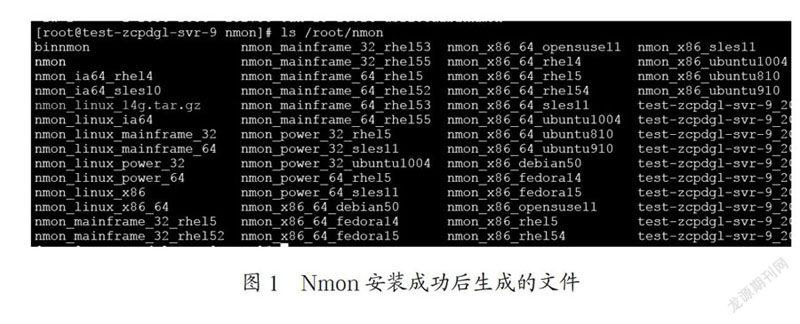
(7)此时安装目录下会出现nmon文件,执行授权命令:#chmod +x nmon,完成安装,如图1所示。
(8)用ftp将生成的nmon文件下載到自己的电脑上。
2 数据采集
性能测试时,需要根据测试……
登录APP查看全文
