基于CAXA制造工程师背景下三维立体零件的造型与仿真
2021-12-09 12:42:23王晓波
内燃机与配件
2021年23期
关键词:数控加工
王晓波

摘要: CAXA制造工程师是一款集CAD/CAM功能于一体的国产工业设计软件,本文结合该软件所具备的功能,以奔驰车标的加工方案为例详细介绍了基于CAXA制造工程师2016大赛版环境下,对车标建模造型、轨迹生成、虚拟仿真、后置处理、生成程序加工代码的设计与制造过程。借助设计三维立体零件模型演示建模过程,通过虚拟仿真加工说明利用CAD/CAM编程可实现复杂零件的自动编程和代码生成,为初学CAD/CAM软件的人员提供参考和借鉴。
Abstract: CAXA manufacturing engineer is a domestic industrial design software that integrates CAD/CAM functions. This article combines the functions of the software and takes the processing scheme of Mercedes-Benz car logo as an example to introduce the CAXA manufacturing engineer 2016 competition version in detail. The design and manufacturing process of vehicle logo modeling, trajectory generation, virtual simulation, post-processing, and program processing code generation. The modeling process is demonstrated with the aid of the design of three-dimensional part models, and the virtual simulation processing shows that the use of CAD/CAM programming can realize the automatic programming and code generation of complex parts, which provides reference for the beginners of CAD/CAM software.
關键词: CAXA制造工程师;实体设计;数控加工
Key words: CAXA manufacturing engineer;physical design;CNC machining
中图分类号:TH164 文献标识码:A 文章编号:1674-957X(2021)23-0101-02
0 引言
在实际生产环节,常采用数控铣床对平面类和曲面类零件进行实体加工。对于传统的简单零件基本是通过手工编程实现,但需要消耗大量的时间编制,而且后续还要进行程序调试,耗时耗力,当遇到一些图形复杂的平面零件或者是三维立体曲面类零件时,仅仅依靠手工编程就显得束手无策了,不仅耗时间,又难以控制精度和准确度。因此,面对这类零件的加工,我们首先想到的是使用工业自动编程软件。
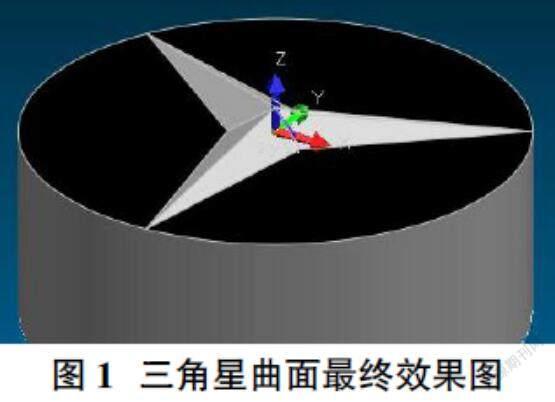
CAXA制造工程师做为一款工业自动编程软件,主要具备线框造型、曲面造型、实体特征造型等功能,能够很好的解决复杂类曲面零件的加工问题。下面就以奔驰LOGO的实体造型为例进行进一步阐述说明。
1 建模造型
建模步骤:①单击零件特征树的“平面XY”,选定该平面为草图基准面,在平面XY创建草图0,绘制半径为19.5mm,圆心为中心的圆,单击特征生成中的拉伸增料,在弹出的对话框中输入深度值10,并选择反向拉伸,单击“确定”按钮。……
登录APP查看全文
猜你喜欢
科技创新与应用(2016年34期)2016-12-23 18:55:29
职业·中旬(2016年9期)2016-12-22 20:21:22
东方教育(2016年3期)2016-12-14 14:46:50
东方教育(2016年4期)2016-12-14 08:03:29
中国新技术新产品(2016年22期)2016-11-29 05:28:05
东方教育(2016年16期)2016-11-25 03:43:51
商情(2016年39期)2016-11-21 09:52:03
科技资讯(2016年18期)2016-11-15 20:12:18